A great stream can create weeks of short-form content, if you capture it correctly.
That is what streaming recording is really about in 2026: recording a clean, high quality “master” once, then repurposing it into vertical clips and distributing those clips everywhere your audience scrolls. The problem is not usually editing, it is the workflow friction. Downloading VODs, exporting versions for each platform, reuploading four times, rewriting captions, and tracking what went where can quietly steal hours every week.
This guide walks through a practical, creator-friendly approach: how to record your streams for repurposing, how to prep footage for Shorts/Reels/TikTok, and how to simplify posting so you can stay consistent without living in upload screens.
What “streaming recording” means (and why local recording matters)
Most platforms will keep a VOD of your livestream. That is helpful, but relying on a platform VOD is often a compromise for repurposing because:
- The VOD may be limited in resolution or bitrate compared to what you can record locally.
- Audio can be “baked in” with alerts, music, and voice at the same level, which makes cleanup harder.
- If anything glitches (network drops, encoder hiccups), your VOD can reflect it.
A local recording made on your machine while you stream is the closest thing to a master file. It gives you higher quality source footage, better editing flexibility, and fewer surprises when you crop to vertical.
If you use OBS Studio, its recording features and settings are well documented in the official resources, which is a good baseline reference when you want to optimize quality and file size for your setup.
Capture once: a recording setup that repurposes well
You do not need a complex studio to create a strong master recording, but you do need to record with repurposing in mind.
Prioritize a “clean” scene layout
If you already know you want vertical clips, design your live layout so it can crop cleanly later.
Examples:
- Keep key gameplay or your face camera closer to the center of the frame.
- Avoid tiny text overlays pinned to the far left or far right.
- Leave some space around critical UI if possible (cropping to 9:16 can cut off edges).
Record at a quality level that survives cropping
Vertical repurposing is basically a zoom. If your source is too low-resolution or too compressed, clips can look soft quickly.
A common approach is recording at 1080p (or higher if your machine can handle it), then exporting vertical versions at 1080x1920.
Codec guidance (safe defaults across platforms):
- H.264 video codec (widely supported)
- AAC audio
- MP4 container
Platform specs change, but these settings generally upload cleanly to TikTok, Instagram Reels, YouTube Shorts, and Facebook.
Separate your audio when possible
If your streaming software supports multiple audio tracks, consider separating:
- Microphone
- Desktop audio (game, browser)
- Music
This helps when you want to remove or lower music under speech for short clips, and it reduces the chance a great moment becomes unusable.
Repurpose the recording: turn one stream into many vertical clips
Once you have a master recording, the next step is repeatable clip production.
Find moments that work in silent autoplay
Short-form feeds are brutal. Viewers decide fast, often with the sound off. When reviewing your stream recording, look for moments with:
- A clear “turn” (win, fail, reveal, reaction)
- A strong first line (a claim, a question, a surprise)
- Visual clarity (you can understand what is happening without context)
Build a simple clip template
A template prevents every clip from becoming a brand-new editing project.
A practical template might include:
- 9:16 crop
- Burned-in captions (or platform captions if you prefer)
- Subtle title at the top (optional)
- Consistent font and safe margins
Export in batches
Instead of exporting one clip and immediately uploading it, export several clips in one batch. Batching is one of the highest leverage habits for consistency.
If you create 10 clips from one stream, you can post for two weeks without needing to stream again.
Post everywhere: why distribution is the bottleneck (and how to remove it)
Most creators underestimate how expensive multi-platform distribution becomes over time.
The manual approach typically looks like:
- Export a clip
- Upload to TikTok
- Reupload to Instagram Reels
- Reupload to YouTube Shorts
- Reupload to Facebook
- Rewrite or tweak captions for each
- Track which version went where
Even if each upload is “only a few minutes,” it adds up fast when you are posting consistently.
Manual posting vs a cross-post workflow
Here is the core tradeoff:
| Workflow | What you do each time you publish | Best for | Main downside |
|---|---|---|---|
| Manual uploads | Upload separately to each platform and redo metadata | One-off posts, occasional creators | Time sink, inconsistent posting, easy to miss a platform |
| Cross-posting | Upload once and distribute to multiple platforms | High-volume short-form, stream repurposing | You need a tool and a repeatable process |
A practical way to “upload once, post everywhere”
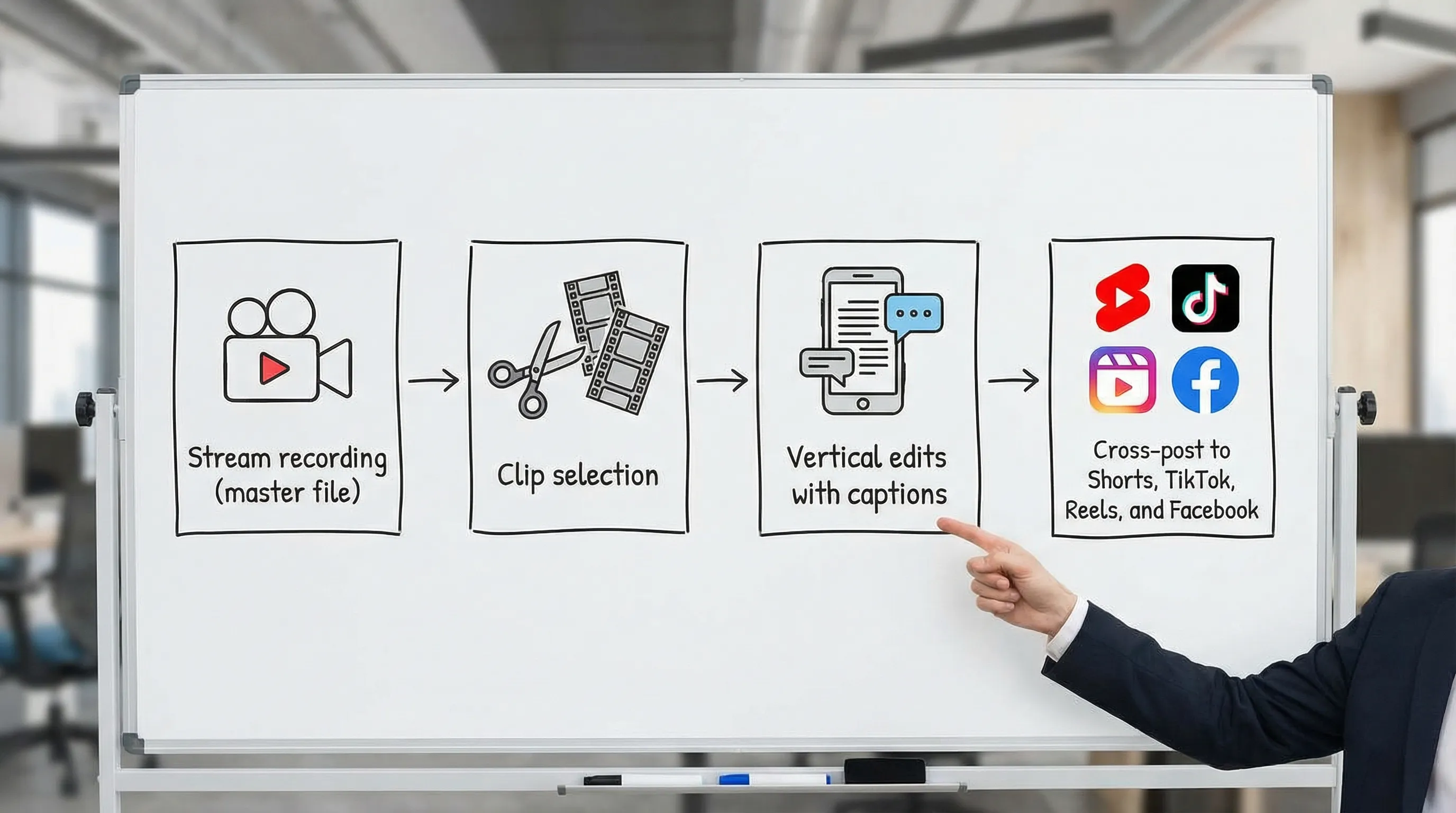
If your goal is to turn streaming recordings into consistent short-form output, the smoothest system is:
- Record locally while streaming.
- Clip and export vertical videos in batches.
- Cross-post your exported clips to multiple platforms from one place.
That last step is where a purpose-built cross-post tool can save the most time.
Multiposter.io is built around the simple promise: upload once, post everywhere. It is designed for creators who want to cross post videos to YouTube Shorts, TikTok, Instagram Reels, and Facebook without repeating the same upload workflow four times.
One important note: the app is JavaScript-based, so your browser needs JavaScript enabled for the interface to load and function.
Best practices to protect reach when cross posting
Cross posting is about saving time, but you still want each clip to perform.
Avoid obvious platform watermark issues
Many creators edit once and download a watermarked version from one platform, then reupload elsewhere. That can reduce perceived quality and may affect distribution.
A cleaner method is exporting from your editor (no watermark) and then distributing.
Write captions that travel
You do not need entirely different captions for every platform, but you do want captions that make sense anywhere.
A good cross-platform caption usually:
- States what the viewer will get (“Watch this strategy break the boss fight in 20 seconds”)
- Includes minimal niche context (so new viewers are not lost)
- Avoids referencing platform-specific features (“link in bio” can be fine, but keep it generic)
Keep a lightweight tracking habit
If you are posting clips to multiple platforms, you will learn faster if you track just a few fields:
| Field to track | Why it matters | Simple approach |
|---|---|---|
| Clip topic | Helps you find repeatable winners | 2 to 5 words per clip |
| Hook type | Teaches you what stops the scroll | Question, claim, reaction, tutorial |
| Publish date | Helps you space content and avoid duplicates | Use your calendar |
| Best platform | Some clips will “fit” better somewhere | Note the top performer |
You do not need a complicated spreadsheet. The point is to avoid guessing.
Common streaming recording pitfalls (and quick fixes)
“My clips look blurry after cropping”
This usually comes from low resolution recording or heavy compression. Increase recording quality (as your hardware allows), and export vertical clips at 1080x1920.
“My voice is too quiet compared to the game”
Separate audio tracks if you can, or rebalance in your editor using a consistent voice target level.
“My overlays get cut off in vertical”
Reposition the most important elements toward the center of the frame for your next streams, or create a recording scene that is repurpose-friendly.
Frequently Asked Questions
What is streaming recording? Streaming recording is the process of capturing a high quality recording of your livestream (often locally) so you can edit and repurpose it into clips and posts later.
Is it better to record locally or download a platform VOD? Local recording is usually better for repurposing because quality is more consistent and you have more control over audio and compression.
What format should I export for Shorts, Reels, TikTok, and Facebook? A safe default is vertical 9:16 (often 1080x1920), MP4, H.264 video, and AAC audio. Always double-check current platform upload guidance for any changes.
Can I post the same clip to multiple platforms? Yes. Many creators publish the same core clip across platforms, then adjust captions or the first line to match the audience and norms of each app.
Do I need anything special to use Multiposter.io? You need a browser with JavaScript enabled, since the app uses a JavaScript-based interface and dynamic content loading.
Turn your streaming recordings into a repeatable posting system
If you are already doing the hard part (showing up and streaming), your next growth unlock is consistency in distribution.
When you have a batch of vertical clips ready, use a workflow that avoids four separate upload sessions. With Multiposter.io, you can upload once and cross post videos to YouTube Shorts, TikTok, Instagram Reels, and Facebook from one place, so your streaming recording turns into content everywhere your audience is watching.